



Riot just dropped one of the bigger quality-of-life changes Vanguard has seen since launch. Starting now, the anti-cheat no longer has to live in your system tray 24/7. With a new feature called Vanguard On-Demand, the driver can stay asleep until you actually open League of Legends or VALORANT, then shut back down once you close the game. For a piece of software that has spent years being the poster child for “always-on kernel anti-cheat,” that’s a pretty big shift in attitude.
The catch, and there’s always a catch, is that this only works if your PC meets a specific set of modern security requirements. Riot is calling that checklist Vanguard Pre-Check, and your machine has to pass it before the on-demand option unlocks.
Vanguard On-Demand Changes
Right now, Vanguard’s driver boots up the moment Windows starts. That’s the whole reason people complain about it sitting in their tray when they’re just browsing or watching something. Riot built it that way on purpose, since starting before the game launches gives the anti-cheat a much better shot at catching cheaters who try to slip a kernel exploit in before anything else loads.
On-Demand flips that. Instead of launching at system start, Vanguard’s driver only fires up when a Riot game does, and it powers down when you’re done playing. Your taskbar gets a little breathing room, and Vanguard stops being a permanent resident on your PC. Riot’s anti-cheat lead, Phillip Koskinas, who wrote the announcement, summed up the spirit of it by saying Vanguard can finally end its watch once the system can defend itself.
The important part for most people is that none of this is forced. If you’d rather leave Vanguard running the way it always has, you can ignore this entirely, and nothing changes for you.
The Windows 11 and Hardware Requirements You Need
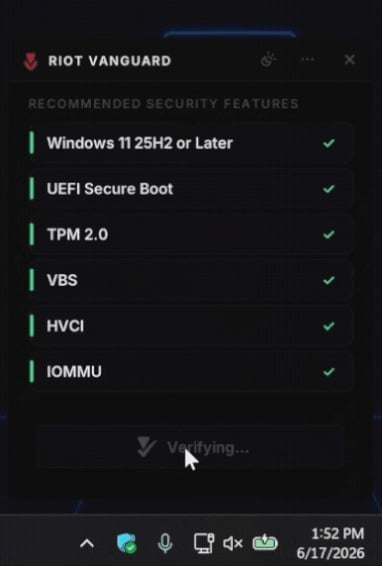
This is where you’ll want to pay attention, because the requirement list is genuinely strict. To flip Vanguard into on-demand mode, your system needs to be running Windows 11 25H2 or later, and you need the following security features all switched on: UEFI Secure Boot, TPM 2.0, Virtualization-Based Security (VBS), Hypervisor-Protected Code Integrity (HVCI), and IOMMU.

If you bought a decent prebuilt or laptop in the last couple of years, there’s a real chance most of this is already enabled out of the box. Riot says roughly 35 percent of players already sit in a “secured core” state and meet Pre-Check requirements without doing anything. And for everyone else, a lot of these are UEFI settings that Vanguard physically cannot toggle for you, so you’d have to enable them manually in your BIOS.
Riot is rolling out a redesigned tray app called VGTray to walk you through it. It identifies which settings are still missing, links you to the right support articles, and then disappears once everything checks out. Still, the company is upfront that messing around in BIOS can get tricky depending on your motherboard vendor, so they’re warning people not to change settings blindly without checking their manufacturer’s documentation first.
Why Riot Couldn’t Do This Until Now
The natural question is why this wasn’t possible from day one. The short version is that Vanguard’s whole job of policing vulnerable drivers required it to run constantly. If it wasn’t there at boot, a cheater could load a compromised driver early, map in a cheat, then unload before the game ever opened.
What changed is a new Windows feature called the Runtime Driver Attestation Report, which Riot says it worked on directly with Microsoft’s Xbox OS Security Team. In plain terms, it gives the anti-cheat a way to see a list of every driver that loaded since boot, even if Vanguard wasn’t running at the time to watch it happen. That data gets measured into your TPM, which is why the chip is a hard requirement. It’s basically a tamper-proof receipt of what touched your kernel while Vanguard was asleep.
That feature only landed in Windows 11 25H2, which is the main reason that specific version is the minimum. Riot also points out that cheaters love downgrading to older operating systems precisely because they have fewer of these protections, so locking on-demand mode to a newer, hardened setup makes sense from their side.
Should You Bother Enabling It?
Honestly, that depends on how much the always-on behavior bugs you. If Vanguard sitting in your tray has never bothered you, there’s zero pressure to touch any of this. Riot repeated the word “optional” so many times in the announcement that it almost reads like a running joke.
But if you’re the type who hates background processes you didn’t ask for, and your hardware already passes Pre-Check, this is a clean win. You get a less intrusive anti-cheat experience without giving cheaters any new room to operate, since the security features doing the heavy lifting are the same ones cheaters refuse to turn on anyway. Riot notes only about 3 percent of weekly players in its regions lack the hardware to support these changes at all, so the door is open for the vast majority of the player base whenever they’re ready to walk through it.
The button to switch over will show up with your next Vanguard update.