
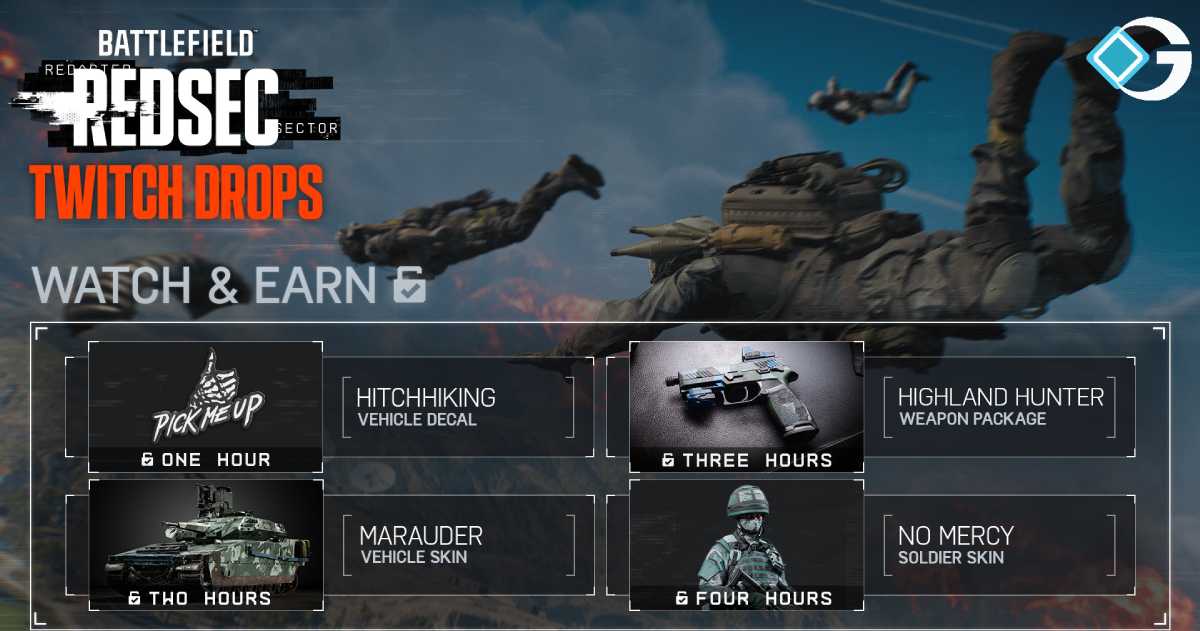
This guide is for you if you’re excited for the Battlefield REDSEC, the free-to-play battle royale mode in Battlefield 6, and want to get some free cosmetics. You can get unique skins for vehicles and weapons, a military skin, and more just by watching streams on Twitch in Season 1. This is how to acquire those Twitch Drop rewards, what you’ll get, and all the tips so you don’t miss out.
What are Twitch Drops for Battlefield REDSEC?
Game publishers provide players with free Twitch Drops as a reward for watching streams for a certain amount of time. Electronic Arts (EA), the publisher of Battlefield REDSEC, has started a campaign during Season 1 where you can earn in-game stuff by watching your favorite creators stream the game. These drops are great since they help both REDSEC and Battlefield 6 players. When you link your accounts, you gain rewards in both games.
Step-by-Step Guide: How to get Twitch Drop Rewards for REDSEC
Here’s a clear walkthrough:
1. Link your Twitch account with your EA account
Before anything else: make sure your Twitch account is connected to your EA account. The official EA page shows that you must link your accounts first to be eligible.
- Go to your EA account settings.
- Navigate to Connected Accounts or Linked Accounts.
- Find Twitch and link it.
- Make sure the correct Twitch username is used.
2. Watch participating streams during the campaign window
You’ll need to tune in to streams where the streamer is playing Battlefield REDSEC and has “Drops enabled.” The official window for Season 1 is:
- From: October 28 at 8 a.m. PT
- To: November 4 at 11:59 p.m. PT.
3. Claim your Drop on Twitch
Once you hit the watch-time threshold for a reward, you’ll need to claim it on Twitch. There’s a “Drops” inventory section in Twitch (under your profile -> Drops).
- Go to Twitch -> your profile -> Drops.
- Find the reward, click “Claim”.
- Ensure it is registered as claimed.
4. Log into Battlefield REDSEC (or Battlefield 6) to receive it
Once claimed, the reward should appear in-game. After you claim on Twitch and then log into the game, the reward will be granted. In short,
- Launch Battlefield REDSEC (or Battlefield 6 if you have it).
- Check your inventory for the new item (vehicle decal/skin, weapon package, soldier skin).
- Equip it or use it in-game.
What rewards are available (and how long to watch)
Here’s the breakdown of what you can earn and how long you need to watch:
| Watch Time | Reward |
|---|---|
| 1 hour | “Hitchhiking” Vehicle Decal |
| 2 hours | “Marauder” Vehicle Skin |
| 3 hours | “Highland Hunter” Weapons Package |
| 4 hours | “No Mercy” Soldier Skin |
So in total, if you watch for 4 hours during the campaign, you can grab all four reward tiers.
Tips & things to watch out for
- Ensure you’re actually “watching”: The timer increments only if you’re actively in the stream tab. Staying idle or paused may not count toward the threshold.
- Claim within 24 hours: The reward appears in Twitch Drops inventory, but you must claim it soon before it expires.
- Log in after claiming: You need to log into the game (REDSEC/Battlefield 6) for the reward to show up. Just linking your account and claiming on Twitch isn’t enough.
This Twitch Drop campaign is a no-brainer if you want to add to your cosmetic collection in Battlefield REDSEC and Battlefield 6 without paying any actual money. It’s easy: connect your accounts, choose the proper stream, watch the requisite hours, claim your drops, get into the game, and get your rewards.