


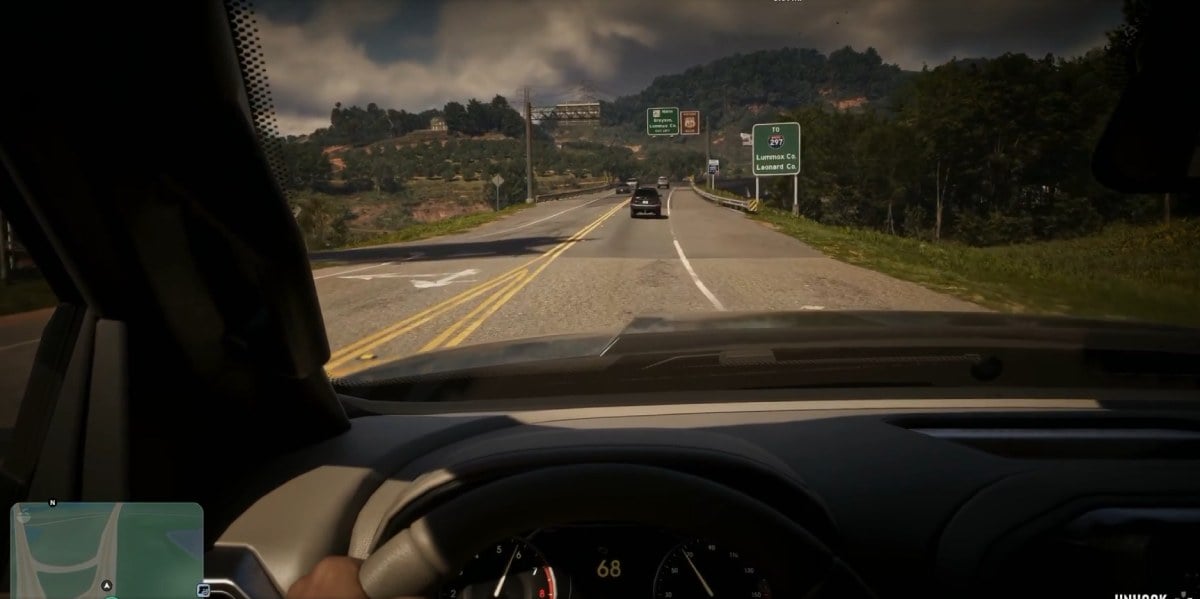
Grand Theft Auto 6 doesn’t officially support a full first-person mode like GTA 5. However, players have already discovered a clever glitch that lets you explore Vice City through the eyes of Jason and Lucia.
The best part? You can actually walk, drive, shoot, and explore in first-person using this trick. Here’s how to activate first-person mode in GTA 6 on PS5 and Xbox Series X|S.
In Brief
- GTA 6 doesn’t have an official, permanent first-person mode at launch.
- Players discovered a glitch that enables playable first-person gameplay.
- The trick works on PS5 and Xbox Series X|S using the phone and camera controls.
- You can return to third-person by reloading your saved game.
How to Unlock First-Person Mode in GTA 6
Although Rockstar hasn’t included a dedicated first-person camera option, players have discovered a workaround involving the in-game phone and camera settings.
The glitch was first shared by players shortly after GTA 6 launched on November 19, 2026. It works by keeping the camera in first-person after your character puts their phone away.
Here’s how to activate it:
- Open Settings: Pause GTA 6 and navigate to the Controller settings.
- Change Camera Controls: Under Controller Features, change the Touch Pad Button (PS5) or Back Button (Xbox) from Map to Camera.
- Enter a Vehicle: Get inside any car and sit in the driver’s seat.
- Open Your Phone: Press Up on the D-pad to bring out Jason or Lucia’s phone.
- Close the Phone: Press Circle on PS5 or B on Xbox to put the phone away.
- Quickly Press the Camera Button: Immediately press the Touch Pad on PS5 or Back Button on Xbox as the phone closes.
- Enjoy First-Person Mode: If timed correctly, your camera will remain in first-person even after the phone disappears.
The timing is important. You need to press the camera button almost immediately after closing your phone. If it doesn’t work the first time, simply repeat the process.
Once activated, you can exit your vehicle and explore the world from a first-person perspective.
This is particularly interesting when exploring GTA 6’s enterable buildings and interiors, as you can experience Rockstar’s detailed environments up close.
How to Switch Back to Third-Person in GTA 6
Since this is a glitch rather than an official camera option, switching back isn’t as simple as pressing the camera button again.
The most reliable way to return to third-person is to save your game and reload that save.
Be aware that certain menus and interactions can also interrupt the glitch and reset your camera.
Other Ways to Use First-Person View in GTA 6
Even without using the glitch, GTA 6 includes a few situations where you can temporarily access first-person perspectives.
- Inspect Surroundings: Stand still, hold L2 (PS5) or LT (Xbox), and press R3 or the right stick to look around in first-person.
- First-Person Aiming: Equip a weapon with an optic, aim using L2 or LT, and press R3 or the right stick to look through the sight.
- Phone Camera: Opening your phone can switch the perspective to first-person, although the phone covers part of your screen.
If you’re still getting familiar with GTA 6’s controls and interface, check out our complete guide to GTA 6 HUD icons.
Will GTA 6 Get an Official First-Person Mode?
Rockstar Games hasn’t announced any plans to introduce a dedicated first-person mode.
However, the discovered glitch shows that some first-person functionality already exists within the game, including weapon animations and movement.
The perspective still has occasional visual issues, including clipping and awkward animations, so it isn’t quite as polished as a dedicated camera mode.
As of writing, the glitch is the closest thing players have to a fully playable first-person experience in GTA 6.
Since this is an unintended workaround, Rockstar could potentially fix it in a future update.
For more tips, walkthroughs, and discoveries, check out our complete GTA 6 guides and coverage.