



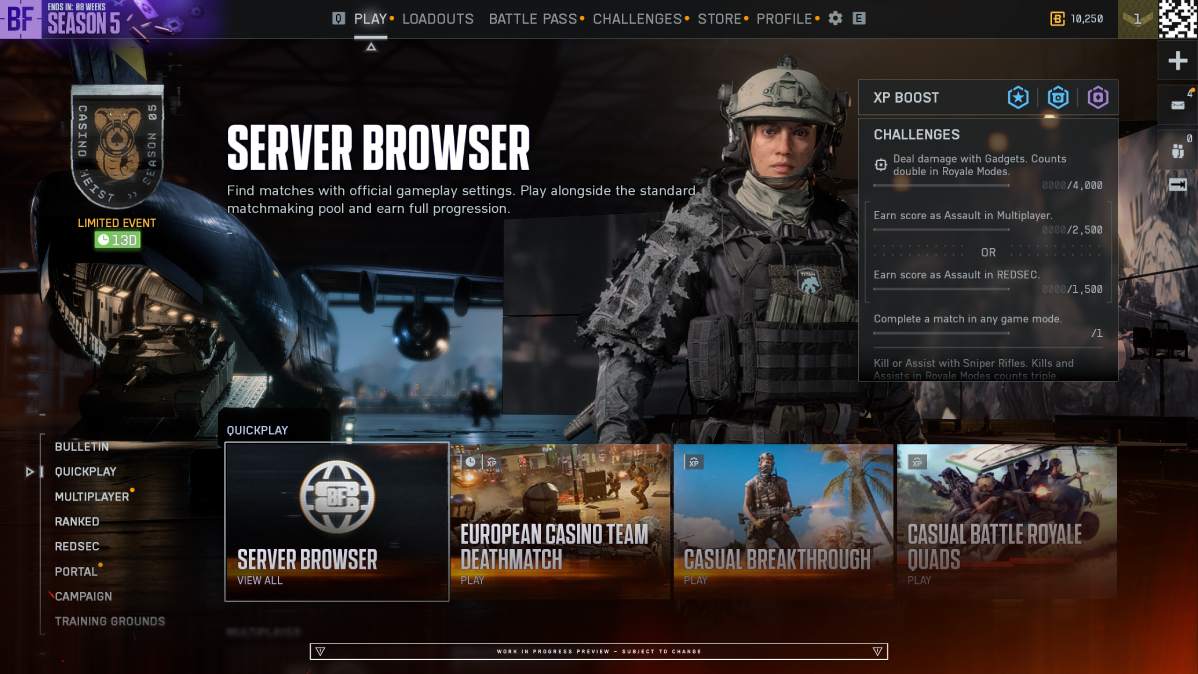
Battlefield 6 players won’t have to wait until December to get their hands on one of the game’s most requested features. EA has officially confirmed that the Battlefield 6 Server Browser is arriving earlier than originally planned, with a staged rollout beginning shortly after November 10, 2026.
The feature was initially scheduled for Season 5 Phase 3 in December. However, Battlefield Studios has decided to move things forward, giving players earlier access to persistent servers, custom matchmaking filters, and the ability to choose exactly where they want to play.
In a new community update, EA also detailed how the Server Browser will work, including player-hosted servers, full XP progression, matchmaking backfill, and persistent lobbies.
In Brief:
- Battlefield 6’s Server Browser is arriving early, with limited public testing beginning shortly after November 10 instead of the originally planned December 8 release.
- EA will introduce the feature in two stages, starting with a limited player test before expanding to a full global launch.
- Players will be able to browse official and player-hosted servers, filter by map and mode, and enjoy persistent lobbies with full XP progression.
- Player-hosted servers can remain online without their hosts and stay listed for up to seven days without activity.
Battlefield 6 Server Browser Release Date Moved Forward to November 2026

EA has confirmed that the Battlefield 6 Server Browser will begin rolling out earlier than originally announced.
The feature was previously planned for December 8, 2026, as part of the Season 5 Phase 3 update. However, developers are now targeting a staged rollout shortly after Season 5 Phase 2 launches on November 10.
In its official announcement, EA stated:
“The Server Browser in Battlefield 6 is arriving earlier than announced. Originally planned for Phase 3 of Season 5, we are pulling the timeline forward to begin our staged rollout shortly after Phase 2 launches on November 10!”
Rather than releasing the feature to everyone simultaneously, Battlefield Studios will introduce it through two stages.
Stage 1: Limited Public Scale Test
Shortly after November 10, a limited group of players will gain access to the Server Browser directly within the live game.
During this period, developers will evaluate server stability, matchmaking queues, server loads, and how effectively matches fill with new players.
Stage 2: Full Global Launch
Once the testing phase is complete and EA is satisfied with server performance, the feature will become available worldwide.
EA hopes to complete both stages over approximately two weeks, although the actual timeline will depend on testing results and any necessary fixes.
This means the Server Browser could become widely available before its originally planned December release, but an exact global launch date has not been confirmed.
Battlefield 6 Server Browser Features: Persistent Lobbies, Filters, and Full XP
EA has also shared a detailed breakdown of what players can expect from the Server Browser at launch.
The feature will give players more control over their multiplayer experience rather than relying entirely on automatic matchmaking.
Some of the biggest features include:
- Official and player-hosted servers: Browse and join dedicated Battlefield Studios servers alongside official servers created by other players.
- Persistent lobbies: Remain on the same server with your squad across multiple rounds instead of returning to the main menu after each match.
- Advanced server filters: Search for specific maps and game modes, or sort results by ping, player count, server name, and recommendations.
- Full XP and progression: Official servers support normal XP earnings, weapon mastery, and challenge progression.
- Shared matchmaking pool: Quickplay, Multiplayer, Custom Search, and the Server Browser connect to the same official server pool, helping keep matches populated.
The return of persistent lobbies is particularly exciting for longtime Battlefield players.
Players who prefer a specific map rotation or want to continue playing with the same squad will finally have a more direct way to do so.
Even servers running a single map continuously, such as 24/7 Conquest servers, will allow players who join through the Server Browser to stay for consecutive rounds.
Battlefield 6 Server Browser Will Support Player-Hosted Servers
Another major addition is the ability to create persistent official player-hosted servers.
Unlike traditional player-hosted sessions, these servers run on dedicated infrastructure, meaning the person who created the server doesn’t have to remain online to keep it active.
Players can create a server, leave the game, and return later without interrupting the experience for everyone else.
EA has also confirmed several important details about how these servers will function:
- Player-hosted servers remain visible in the browser even when empty.
- Servers can remain listed for up to seven consecutive days without players.
- The seven-day inactivity timer resets whenever someone joins.
- Hosts can manually shut down their servers at the end of a round or when creating a new server.
- Matchmaking backfill becomes available once at least one player joins an eligible server.
However, there is one important limitation.
Automatic matchmaking backfill only works for modes currently available through the main Quickplay or Multiplayer menus.
For example, Conquest and Breakthrough servers can receive additional players through matchmaking after someone joins.
Meanwhile, servers featuring modes that have rotated out of the main playlists will need players to find and join them manually through the Server Browser.
If those modes eventually return to the main menus, automated backfill can resume without the server needing to be recreated.
Battlefield 6 Server Browser: Official, Verified, and Custom Servers Explained
The new Server Browser organizes multiplayer experiences into three main tabs: Official, Verified, and Custom.
Here’s how each category works:
| Server Type | Matchmaking | XP Progression |
|---|---|---|
| Official Studios | Full matchmaking integration | Full XP and mastery |
| Official Player-Hosted | Backfill for eligible active modes | Full XP and mastery |
| Verified | Player and bot fill, direct joining | Full XP |
| Custom | Direct joining and invitations | Partial XP |
Both Battlefield Studios servers and official player-hosted servers appear together under the Official tab.
Verified servers offer community-created Portal experiences built using approved presets, while Custom servers allow more extensive modifications and custom gameplay logic.
EA confirmed that existing Portal tools, rule modifiers, and administrative controls for Verified and Custom servers will remain unchanged.
Players looking to earn weapon attachments, complete challenges, and progress normally can stick to the Official category without worrying about reduced XP rewards.
How to Access the Server Browser in Battlefield 6
EA wants the Server Browser to be easy to find once it becomes available.
Instead of hiding the feature deep inside Battlefield Portal, developers have placed it directly within the main Quickplay menu.
To access it, players will be able to:
- Launch Battlefield 6 and open the main multiplayer menu.
- Navigate to the Quickplay row.
- Select the Server Browser tile.
- Browse the Official tab to find available servers.
- Apply filters for maps, modes, ping, or player count.
- Select a server and join the match directly.
Additional Server Browser shortcuts will also be available in other menus, including Portal.
The feature will appear for players as they receive access during the staged rollout.
Battlefield 6 Is Also Improving Matchmaking and Server Backfill
Alongside the Server Browser announcement, EA explained that it has been making backend matchmaking improvements to support the new system.
One of the main goals is keeping multiplayer matches populated while giving players more control over which servers they join.
However, how players enter a match will affect what happens between rounds.
Joining through Server Browser: Players remain connected to their selected server through its map rotation, provided it stays active and healthy.
Joining through Quickplay or Multiplayer: Players enter the shared official server pool, but may be automatically re-queued after a match if the server continuously repeats the same map and mode.
Joining through Custom Search: Matchmaking prioritizes the player’s selected maps and modes. If the next rotation doesn’t match those preferences, the system can move them to another suitable server.
This approach should allow players who prefer traditional matchmaking to continue using it while giving dedicated server communities more flexibility.
Battlefield 6 Server Browser Could Be a Major Improvement for Multiplayer
The Server Browser has been one of the most anticipated additions to Battlefield 6, especially among longtime fans who enjoy choosing their own servers and playing with familiar groups.
Persistent lobbies, official player-hosted servers, and full progression support could make it easier for players to build regular communities around their favorite maps and modes.
The decision to move the rollout forward is encouraging, although EA is taking a cautious approach to avoid server stability issues during the holiday season.
For now, players can expect limited public testing to begin shortly after November 10, with broader availability planned once the developers finish evaluating live performance.
EA says it will share more information about the exact rollout schedule and a complete Server Browser guide as the feature approaches its global launch.