




How to use Simple Build mode? Let’s find out.
As Fortnite has evolved over the years, Epic Games has highlighted its commitment to accessibility features, such as Simple Build, a streamlined building preset tailored for players seeking quick, effortless, and straightforward building. In 2025, Simple Build has become especially relevant thanks to controller-friendly optimizations and new competitive modes that reward quick decision-making over advanced mechanics.
Whether you’re returning to Fortnite after a break or simply want a less complicated building experience, this guide will walk you through everything you need to know about how Simple Build works and how to enable it.
What is Simple Build in Fortnite?
Simple Build is a beginner-friendly building configuration that replaces individual build pieces with a universal building wheel or preset. Instead of mastering dozens of edits and complex structures, players get access to:
- A simplified build menu
- Quick access to essential structures
- Automatic placement assistance
- Reduced input complexity for controllers and mobile
It is perfect for players who enjoy building but don’t want to memorize edits or sweat through high-APM ramp fights.
How to Turn On Simple Build
Fortnite’s 2025 settings redesign makes enabling Simple Build faster:
- Open Settings
- Go to the Controls/Build tab
- Select Builder Presets
- Choose Simple Build
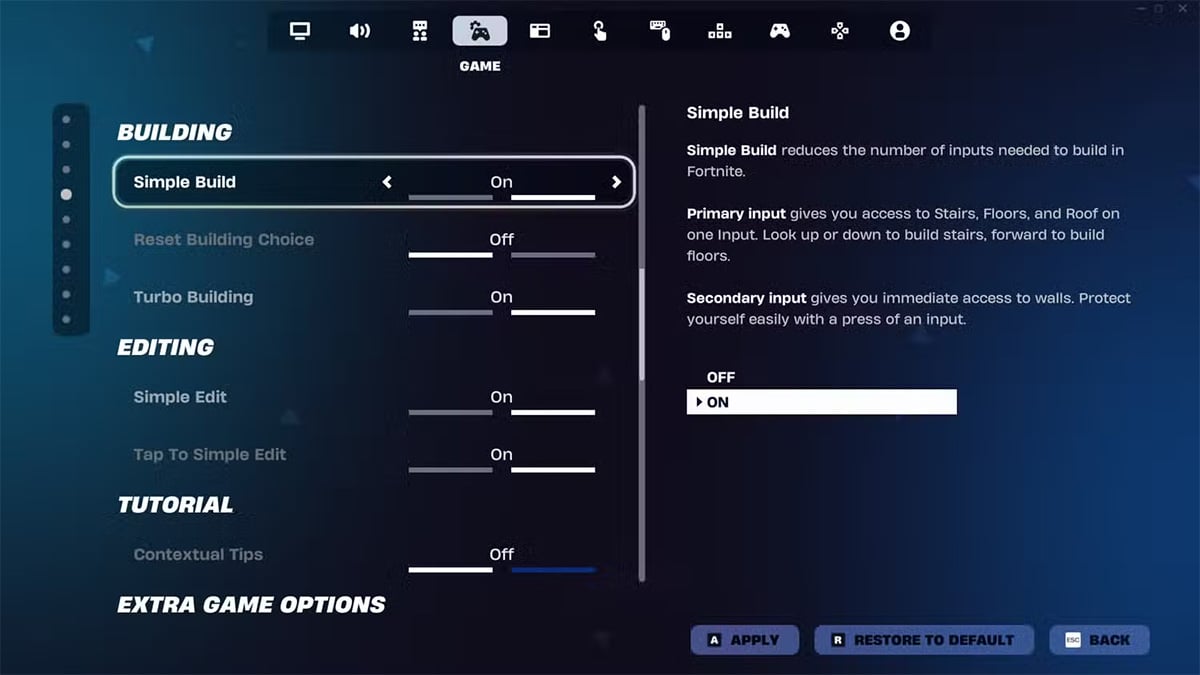
Once enabled, your controls switch to a streamlined layout where fundamental structures are placed automatically based on situation and direction.